When you’re designing a web application, the gap between your design software and real-world usage can feel like a canyon. Sure, your interface looks pristine on Figma’s infinite canvas, but how will it actually appear when someone opens it on their MacBook at a coffee shop? This is where laptop mockups become your secret weapon.
Why Context Matters More Than Perfection
A laptop mockup isn’t just a fancy frame for your screenshots. It’s a reality check that transforms flat designs into tangible experiences. When stakeholders see your web app displayed on an actual device in a realistic setting, something clicks. The abstract becomes concrete. Suddenly, everyone’s speaking the same visual language.
Think about it: presenting your dashboard redesign as a floating rectangle versus showing it on a sleek laptop with ambient lighting and a workspace backdrop. The second option tells a story. It answers the unspoken question every client has—”How will this look in the real world?”
Creating Believable User Scenarios
The magic happens when you match your mockup environment to your target audience. Developing a productivity app for freelancers? Place your design on a laptop surrounded by coffee cups, notebooks, and natural light. Building enterprise software? Opt for a minimalist office setting with neutral tones.
These environmental cues do heavy lifting:
- They help users visualize themselves using your product
- They establish emotional connections before a single line of code runs
- They provide context that pure interface shots simply cannot convey
- They make investor pitches and client presentations infinitely more compelling
Testing Design Decisions Without Building
Here’s where laptop mockups truly shine: rapid iteration. Before committing development resources, you can test how your web app’s color scheme performs against various backgrounds. Does your vibrant UI still pop in a dimly lit environment? Will important CTAs get lost when the screen appears smaller in a realistic context?
By cycling through different mockup scenarios—daylight versus evening, home office versus corporate setting, minimalist versus busy backgrounds—you catch design problems early. That navigation menu that seemed perfect? The mockup reveals it’s barely visible in certain lighting conditions.
Real-World Examples: Mockups in Action
A fintech startup recently used laptop mockups to pitch their banking dashboard to investors. Instead of showing sterile wireframes, they presented their interface on devices in home office settings, coffee shops, and collaborative workspaces. The result? Investors could instantly grasp the product’s versatility and everyday utility. They closed their Series A two weeks ahead of schedule.
An education platform leveraged mockups during user testing sessions. By showing teachers how their course management system would appear on various devices in classroom environments, they gathered more actionable feedback. Teachers pointed out that certain buttons were too small when viewed in realistic desk scenarios—insights that never emerged from traditional prototype testing.
A SaaS company transformed their landing page conversion rate by switching their hero image from a generic screenshot to a laptop mockup showing their app in a contemporary workspace. The change felt minor, but conversion jumped 34% because visitors could finally picture themselves using the tool.
Premium Quality Mockups: The ls.graphics Advantage
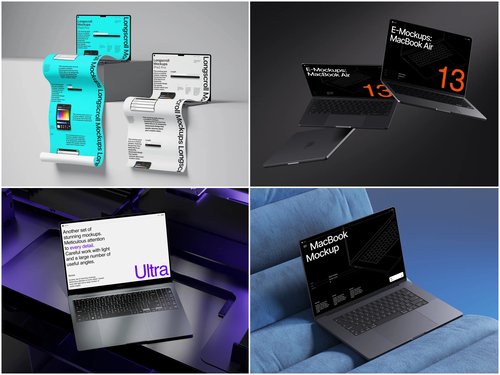
When you need mockups that don’t scream “stock image,” platforms like ls.graphics deliver exceptional results. Their laptop mockup collections stand out for several reasons:
- Ultra-realistic rendering captures every reflection, shadow, and material texture with photographic precision that makes your presentations feel authentic rather than artificial
- Organized layers let you swap screen content in seconds without wrestling with complex masking or spending hours on customization
- Diverse viewing angles range from bird’s-eye workspace shots to intimate close-ups, giving you flexibility to match any presentation context or storytelling need
Additional features that elevate your workflow:
- Multiple color styles from classic silver to modern space gray ensure your mockup matches your brand aesthetic perfectly
- Stylish minimalistic compositions provide just enough environmental context while keeping the spotlight firmly on your web app design
- Effortless usability means even designers new to mockups can achieve professional results within minutes of downloading
Conclusion
Laptop mockups bridge the imagination gap between design and reality. They’re not decorative flourishes—they’re essential tools for validating ideas, communicating vision, and making smarter decisions before development begins. Whether you’re pitching to stakeholders or testing with users, realistic device presentations create understanding that abstract interfaces never achieve. For designers seeking quality that elevates rather than distracts, resources like ls.graphics provide the professional polish that turns good presentations into unforgettable ones.